
Home > News
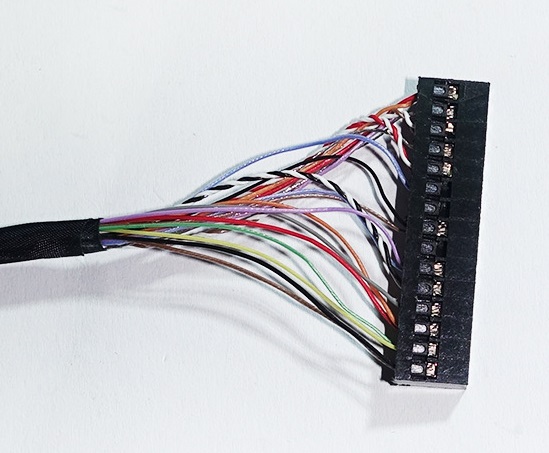
The EDP cable is the transmission cable connecting the motherboard and the screen of laptops, all-in-one computers, and industrial displays. Screen display issues such as screen flickering, black screen, or screen flashing often originate from the cable or the screen itself. By conducting step-by-step cross-tests, analyzing phenomena, and replacing hardware, it is possible to quickly distinguish between the two. The following text systematically outlines the judgment logic.
First, observe the fixed characteristics of the fault to initially distinguish the core manifestations. EDP lines damage are mostly contact-type or transmission-type intermittent faults. The fault display will change randomly with the movement of the device. When bending the screen hinge, opening the laptop, slightly pressing the screen edge, or shaking the device, the display will immediately change: sometimes there are colorful stripes, sometimes half of the screen is black, sometimes there are color discontinuities, and the fault occurs intermittently and sometimes disappears when stationary. And the positions of the stripes and color blocks are not fixed. Each shaking of the fault area will randomly change.
Screen body damage faults are permanent and fixed. No matter how you open or shake the device, the position of the bad points, vertical lines, black spots, and light leakage areas will always remain unchanged. Pressing or moving the device will not make the fault disappear; if the screen backlight layer is damaged, it will fix local dark spots and light spots, and the location of the picture tearing will be constant. There will be no obvious changes when stationary or shaking. If the screen driver IC is burned out, it will directly result in a permanent black screen with no intermittent recovery situation.
Second, the cross-replacement test is the most accurate method for determination. If there are spare EDP cables of the same specification available, directly replace the new cables for installation and testing: After the replacement, the display blanking, screen flickering, and intermittent black screen completely disappear, which can confirm that the original EDP cable is damaged; after replacing the cable, the fault does not change at all, and the problem is pinpointed to the screen.
If there are no spare cables that can be removed to access the cables, clean the oxide layer on both ends of the gold fingers, reinsert and secure them, and then test again. Oxidation of the contact points at both ends of the EDP and loose clips are common faults of the cable. Reinserting and tightening the cable temporarily alleviates the fault, indicating poor contact of the cable; without any improvement after reinserting and re-plugging, there is a high probability that the screen hardware is damaged. At the same time, check the appearance of the EDP cable. The cables at the rotation shaft position are prone to cracking due to long-term bending and copper wires may break. Visible damage to the outer skin and exposed copper wires can directly determine the cable damage.
Thirdly, conduct layered troubleshooting for backlight and image signal faults. If only the image is blurry or has stripes, and the backlight is evenly distributed without being dark, it is mostly due to abnormal EDP line signal transmission; if the screen has no image at all but the backlight is normal and the outline of the desktop can be vaguely seen, it is mostly caused by a broken EDP signal line.
If there is partial backlight failure, fixed black spots, or the LCD screen cracking and leaking liquid, it is definitely a screen damage. EDP line faults will not cause physical damage to the LCD panel. In addition, if a single vertical color stripe repeatedly appears and remains in the same position, it indicates a damage to the screen driver IC; if there are multiple messy horizontal and vertical stripes that appear and disappear intermittently, it is due to the interruption of the differential signal transmission of the EDP line.
Fourth, assist in eliminating interference from the motherboard to avoid misjudgment. When testing with an external display, the external screen shows normal operation, indicating that there is no fault in the motherboard's graphics card output. The problem lies only in the EDP cable or the built-in screen. If the external display also has a screen flicker, then the fault is in the motherboard graphics card. Excluding the cables and the screen.
Summary: Abnormal intermittent and random changes in the screen image should first be judged as damage to the EDP cable; fixed positions, no changes when stationary or shaking, presence of leakage black spots, permanently fixed bright lines, belong to screen body faults. Replacing the cable for retesting is the most efficient verification method. During maintenance, the gold fingers and bending points of the cable should be checked first. After eliminating the problem with the cables at a low cost, then replace the screen to reduce unnecessary material consumption.
Contact: Jerry_Shi
Phone: +86-13652508770
Tel: +86-13652508770
Email: [email protected]
Add: LianFeng Road,XianXi Village,ChangAn Town,DongGuan City,GuangDong Province,China