
Home > News
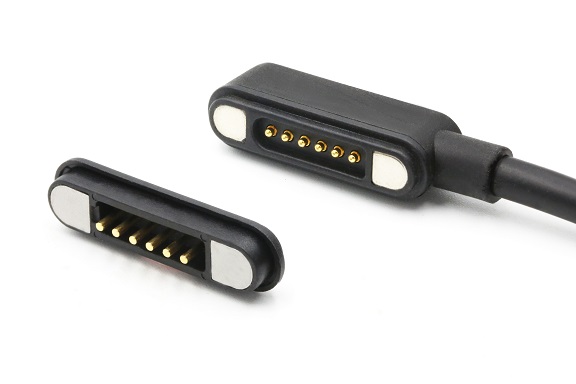
Magnetic charging cables can transmit data, but not all magnetic cables support data transfer. Whether a cable supports data transmission depends on its internal wiring, number of magnetic contacts, shielding structure, and circuit design. On the market, there are three types: pure charging models, low-speed data models, and high-speed multifunctional models, which differ significantly in performance. Many users mistakenly believe that magnetic connectors only support charging, when in fact they have purchased downgraded, lower-cost versions.
From a basic electrical perspective, the key difference between a standard USB cable for charging only and one that supports data transfer lies in the number of internal wires: a pure charging cable contains only two power lines (positive and negative), lacking the D+ and D- differential signal lines, which makes file transmission impossible. Cables capable of data transfer must include at least four wires—two for power delivery and an additional pair dedicated to data differential signaling. This same principle applies to magnetic-attachment cables. These cables consist of two parts: a male magnetic connector (on the cable end) and a female magnetic adapter (a plug permanently installed into the device's port). The two parts automatically align and attach via neodymium magnets and establish electrical contact through spring-loaded gold-plated pogo pins. Only when both ends of the magnetic cable fully support data signal lines, with separate contact zones for power and signal channels, can data synchronization be achieved. To cut costs, low-quality magnetic cables often omit the data contacts entirely, retaining only the positive and negative power contacts. Even if they look identical to high-end multi-functional magnetic cables, they are limited to charging only; connecting them to a computer will not trigger any device detection or pop-up notifications.
The magnetic cable supporting data transmission is divided into two main speed levels. The mid-range general-purpose magnetic Type-C and Lightning products generally support the USB 2.0 standard, with a theoretical bandwidth of 480 Mbps, and the actual transmission speed is stable at 15–30 MB/s, which is sufficient for copying daily photos, documents, and short videos, and can also achieve backup between mobile phones and computers, Android Auto in the car, sharing of mobile phone network (USB network sharing), OTG reading of USB drives, and other basic functions. The high-end professional magnetic cables are equipped with multi-pin contacts, multi-layer aluminum foil shielding, and an internal E-Marker intelligent chip, fully extending the USB 3.0 and above high-speed data channels. Some flagship models can reach 10 Gbps and 20 Gbps bandwidth, supporting large-capacity solid-state mobile hard drives for reading and writing, 4K video transmission, simultaneous file transfer during laptop PD high-power charging, and industrial scenarios with 12-pin custom magnetic connectors that can simultaneously carry power supply, high-speed data, audio, and video multi-channel signals. They are widely used in portable industrial control devices and photography external storage devices.
The magnetic attachment structure inherently introduces natural signal shortfalls, which is the core reason why the popularity of high-speed magnetic attachment data cables is not high. The signal channels of ordinary integrated USB connectors are continuous without any breaks, while the magnetic attachment has two metal contact gaps. During vibration or slight pulling, the contacts are prone to instantaneous disconnection, causing transmission interruptions and file damage. The magnet itself generates a weak magnetic field. If the cable and the magnetic attachment head lack a magnetic shielding layer, electromagnetic interference will interfere with the differential signal, significantly reducing the transmission rate, and even causing unstable device identification. Low-priced unshielded magnetic attachment cables frequently disconnect when transmitting large files. High-end products enhance connection stability by thickening the gold-plated contacts, partitioning the power and signal pins, and wrapping an internal double-layer anti-interference shielding layer. They weaken magnetic field interference and improve connection stability. The attachment force is adjusted, so it will not disconnect under slight shaking, but will automatically separate under accidental heavy pulling, protecting the phone interface from being torn. This design balances stability and safety.
The data compatibility of different interface magnetic connection cables varies significantly. The Android Type-C magnetic connection scheme has the strongest expansion capability, with multi-pin models capable of supporting fast charging, high-speed data transfer, and video output. The Apple Lightning magnetic connection is limited by the official MFi certification, and most uncertified magnetic connection heads have their data functions disabled, only the certified high-end models support iPhone photos and overall device backup. Un-certified products, even if they are labeled as capable of transferring data, are prone to connection interruptions and system non-recognition issues. The old Micro-USB magnetic connection cables basically only retain USB2.0 low-speed data and rarely support high-speed transmission, and are only suitable for small devices such as Bluetooth headphones and smart bracelets for synchronization.
There is a simple and practical way to distinguish whether a magnetic cable supports data transmission: First, check the product label to determine if it is a dual-function model with the labels "data synchronization, file transfer, USB3.0/USB4" indicating it has both data and charging functions, while a label of "fast charging, dedicated charging" indicates it has no data function; Second, conduct a test by connecting the phone to a computer. If a USB debugging and file transfer pop-up window appears, it is a data model; if only a charging without device pop-up window is displayed, it is a pure charging cable; Third, observe the magnetic contact points. 2-pin and 3-pin magnetic heads can basically only be used for charging, while 6-pin, 8-pin, and 12-pin multi-contact models are likely to support data transmission.
In summary, the magnetic cable has a complete hardware foundation for data transmission. The high-quality multi-pin shielded version can meet the needs of both high-power fast charging and high-speed file transfer, suitable for various scenarios such as office work, photography, and vehicle use. However, the low-priced and reduced-function magnetic cable only retains the power supply function. When purchasing for daily use, if you need to frequently copy files and synchronize devices, be sure to choose the magnetic data cable marked with data transmission, multiple gold-plated contacts, and a shielding layer. For simple home charging, you can choose the more cost-effective pure charging magnetic cable. Choosing based on your needs can avoid situations where the functions do not meet your expectations.
Contact: Jerry_Shi
Phone: +86-13652508770
Tel: +86-13652508770
Email: [email protected]
Add: LianFeng Road,XianXi Village,ChangAn Town,DongGuan City,GuangDong Province,China